Begin comfortably.
Take a supported seat, rest your sensor hand, and give yourself a moment to arrive.
 The Mirage™ Systems
RELAXATION. FOCUS. YOUR OWN FEEDBACK.
Make space to slow down, settle your attention, and reconnect with yourself.
Mirage brings guided relaxation, purposeful activities, and feedback from your body into one simple practice. Choose your experience. Find your rhythm. Take it at your pace.

A little space for relaxation and focus.
Explore the session collection · Website interface preview
THE ORIGINAL MIRAGE EXPERIENCE
01 / BUTTERFLY LANDINGOne butterfly. One flower.
A gentle reason to stay in the moment.
Butterfly Landing is Mirage’s original goal-driven exercise. In the app, the butterfly moves closer to the flower as your selected feedback reading approaches the goal you’ve chosen.
Settle comfortably, follow the scene, and notice how your feedback changes. It gives your practice a visible direction—without needing to force a result.
Includes the original app’s piano soundtrack. This website demonstration uses illustrative stages, not your body readings. Live app sessions use a compatible connected pulse oximeter.
Take a supported seat, rest your sensor hand, and give yourself a moment to arrive.
The butterfly and flower offer a simple visual anchor for your attention.
Follow progress toward your selected goal. Readings are feedback, not a relaxation score.
THE SESSION COLLECTION
02 / SIX WAYS TO PRACTISEQuiet scenery. A comfortable breathing rhythm. A task to hold your attention. Explore six different experiences, each with its own guidance and a record of your session.
 GUIDED IMAGERY
Choose Butterfly Landing, an animated feedback scene, or a relaxing film. Explore settings such as Cosmic Ocean, Relaxing Forest, River of Stars and Spiral Galaxy.
Feedback scenes respond to your selected reading. Relaxation films move at their own pace while Mirage records your readings.
Explore guided imageryFollow expanding and relaxing lungs with synchronized spoken cues. Choose 3, 4 or 5 seconds for each half of the breath, then set your session duration.
No breath holds. Pause and resume the timer and guidance together. Choose a pace that feels comfortable, without forcing your breath.
Meet the breathing exerciseTurn over two cards and look for matching pictures. Find eight pairs across 16 cards, with a duration you choose before starting.
Matches stay visible; unmatched cards turn back over. Finish the pairs, reach the time limit, or stop when you choose. Sensor readings are recorded throughout.
Explore Puzzle GameStart at 1000 and subtract 13 each time, aloud. A spoken instruction leads into a 30-second observation. Continue at your own pace.
Mirage records your sensor response during the task. It does not listen to, grade, or score your spoken answers.
Explore Counting BackwardsHealth Scan guides you through 50 spoken questions. Select the answer that best reflects your experience, revisit a previous question, or replay its audio.
Your responses are saved in session history, including when you stop early. This questionnaire supports personal review; it does not produce a diagnosis.
Explore Health ScanPhysical Assessment is a sound-response activity. Set a comfortable volume and keep your sensor hand still during the 30-second observation.
A sound plays about 10 seconds into the session. Remain still for the rest of the observation, or use Stop to end it whenever you need.
Explore Physical AssessmentVisuals above introduce the exercises; the app contains the complete guided sessions. Live sessions require active membership, your assigned compatible oximeter, and current readings.
FEEDBACK WITH CONTEXT
Connect your issued pulse oximeter and see the readings that accompany your session.
Mirage displays pulse rate, oxygen saturation (SpO₂), and perfusion index when your device supplies it. In Butterfly Landing, choose an available signal and a goal, then watch the original scene progress through ten feedback stages.
Adjust duration, graph scales, and available audio options before you begin. AutoGoal can adjust the butterfly target after its criterion has been held for consecutive seconds.
Understand butterfly settingsExample values only. No sensor is connected to this website.
Readings provide context, not a relaxation score or proof of health improvement. Mirage shows device-reported values; a missing perfusion value stays unavailable. Movement and poor sensor contact can affect measurements.
MEET YOUR EVERYDAY PRACTICE
03 / INSIDE MIRAGEThe actual app. Ready for your next moment.
Browse the six sessions, find an image or film in the searchable scene library, and open My progress to review your recorded practice. These are captures of the real app interface, with illustrative history.
Butterfly Landing, nature scenes, and relaxing films in one searchable library.
Find the app for your phone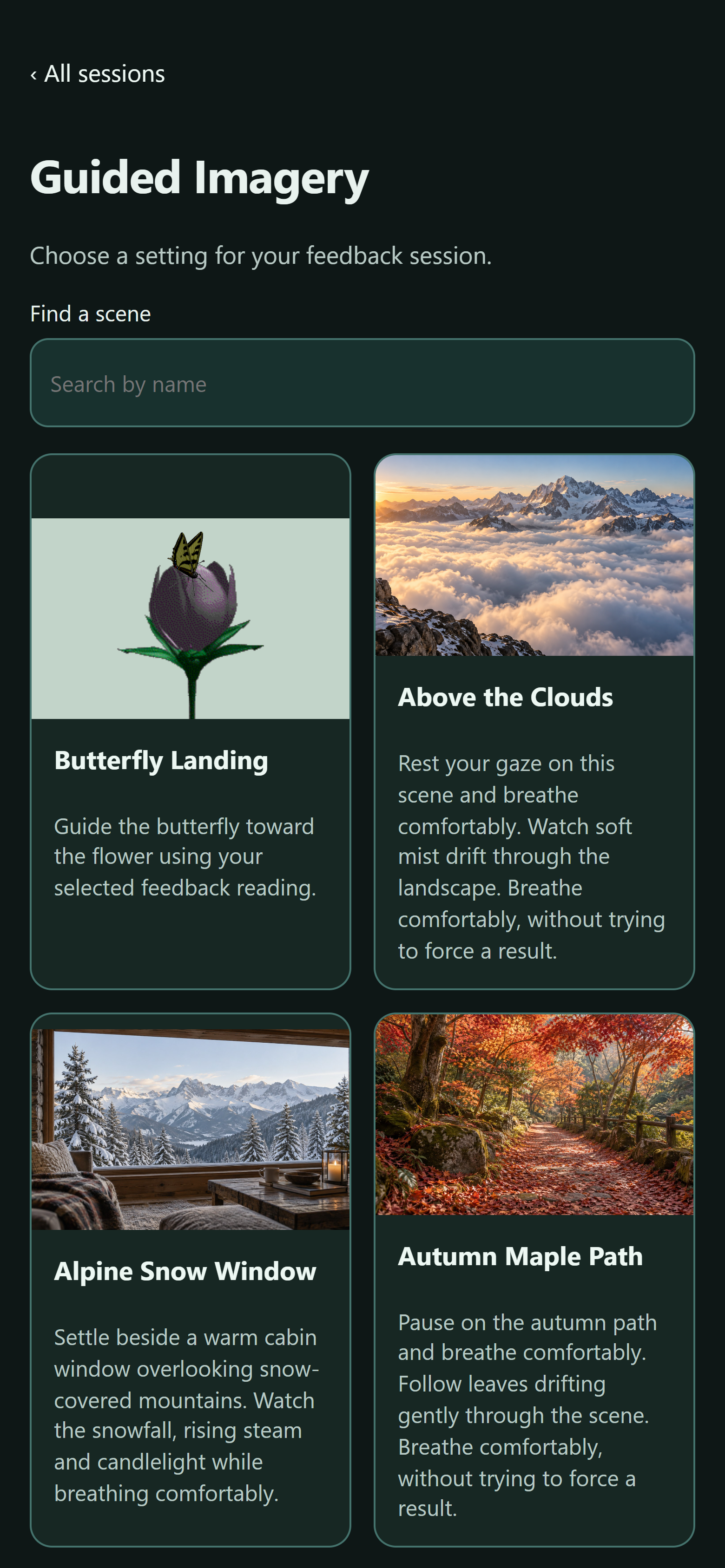
FROM A BUSY DAY TO A QUIETER MOMENT
04 / YOUR PRACTICEYour compatible pulse oximeter connects physiological feedback with the activity on your screen.
Sign in with your membership email and connect your assigned pulse oximeter. Keep your sensor hand supported and still.
Select an activity and follow its guidance. Set available goals, duration, and audio preferences to suit your practice.
Follow the activity at your pace, pause when needed, and revisit your recorded sessions in My progress.
Mirage can display pulse, oxygen saturation, and supported perfusion readings from your device. These signals provide context for your practice; they do not measure relaxation or prove a health improvement.
Measurement & safety informationDESIGNED AROUND YOUR ROUTINE
MORE THAN A SESSIONThe details matter: finding your device, reviewing your practice, and getting help when you need it.
Sign in, switch on your assigned oximeter, and use Scan & connect. Review connection status and wait for fresh pulse and oxygen readings before starting.
Connection guide ↗Start, pause, resume or stop your session. Leaving Mirage or losing current readings stops the session; recorded progress can still be reviewed afterward.
Know your controls ↗Revisit a session's date, duration, outcome and available readings. Health Scan records include your responses. History stays on this phone for your account.
Understand your history ↗Enlarge supported visuals and videos. Use a compatible AirPlay, screen-mirroring, casting or wired display setup to bring the experience to a larger screen.
Display options ↗After setup, cached membership and device details can support permitted sessions with locally available content. Bluetooth and fresh readings remain required; HD films stream online.
How offline access works ↗Open a support ticket, read replies, and share an error report from Help. Review the report before submitting it so the team can investigate your specific issue.
Find help when you need it ↗YOUR FIRST YEAR, WITH MORE INCLUDED
A year of guided relaxation and focused practice, with a compatible pulse oximeter as your free first-year bonus.
Follow your readings, explore all six sessions and build a routine at your own pace. The oximeter comes at no additional charge with your first-year membership.
Start your membershipUNITED STATES · FIRST-YEAR OFFER
$240 $200for your first 12 months
Save $40 + receive a free compatible oximeter
After year one, you choose.
$20/month or $200/year — save $40 compared with 12 monthly payments. Renewal plans do not include another oximeter.
Initial US delivery is included, with an estimated seven-day delivery time. Request a membership refund within three days of receiving your oximeter; return of the device is required. PayPal processing fees and, if delivered, the original shipping cost are deducted. Exchange shipping is paid by the customer. Tax treatment and final launch review remain pending. Read the membership and exchange details ↗

MAKE YOUR NEXT MOMENT A MIRAGE MOMENT
Bring guided relaxation and focused practice into your day. Existing members can sign in to the app with their registration email.
Checking app availability…
Live sessions require an active membership and a compatible assigned sensor. App availability may vary by country or region.
A LITTLE CLARITY BEFORE YOU START
Mirage gives relaxation and focused attention a structure: guided imagery, breathing cues, purposeful tasks, and visible feedback. Your experience is personal, and no particular outcome is guaranteed.
In a live app session, the butterfly’s position reflects your selected feedback reading in relation to your chosen goal. The website preview uses the original artwork with illustrative stages only; it does not connect to a sensor.
A compatible assigned pulse oximeter supplies readings for live sessions. Membership and device connection are separate from the illustrative preview on this page.
Bundled guidance and locally available content support offline practice after setup. Hosted relaxation films require internet. Initial sign-in, membership checks, support, and downloads may also need a connection.
Use the download links above when available. Testing versions are available through Google Play and TestFlight. Use the member portal for your account, order status, and support.
No diagnosis, treatment, or change in health is promised. Sensor readings can be affected by fit, movement, circulation, and other factors. Mirage is not emergency monitoring or a substitute for professional care.